Build an Invoice Processor with Node.js and the AllPDFMagic API
Build a production-ready invoice processor in Node.js. Extract structured data from PDF invoices with AI, output CSV for accounting.
Build an Invoice Processor with Node.js and the AllPDFMagic API
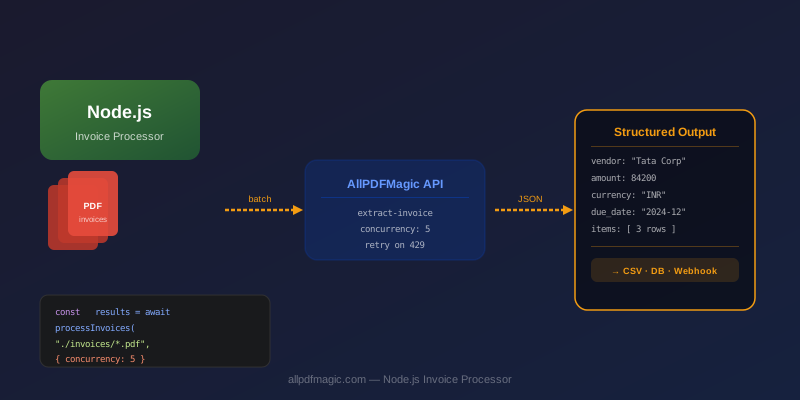
Invoice processing is one of the highest-ROI automation opportunities in any business. Manually keying invoice data from PDFs into accounting software takes 2-5 minutes per invoice — and introduces errors. A Node.js script using the AllPDFMagic API can process the same invoice in under 2 seconds and output clean JSON or CSV.
This guide builds a production-ready invoice processor: accepts PDF invoices from a folder, extracts structured data, and writes a CSV ready for accounting import.
Setup
mkdir invoice-processor && cd invoice-processor
npm init -y
npm install node-fetch form-data dotenv
Create a .env file:
ALLPDFMAGIC_API_KEY=apm_live_your_key_here
Core extractor module
// extractor.js
import fetch from 'node-fetch';
import FormData from 'form-data';
import { createReadStream } from 'fs';
import { basename } from 'path';
import 'dotenv/config';

const API_KEY = process.env.ALLPDFMAGIC_API_KEY;
const BASE_URL = 'https://www.allpdfmagic.com/api/v1';

export async function extractInvoice(filePath) {
  const form = new FormData();
  form.append('file', createReadStream(filePath), {
    filename: basename(filePath),
    contentType: 'application/pdf',
  });

  const res = await fetch(`${BASE_URL}/ai/extract-invoice`, {
    method: 'POST',
    headers: {
      Authorization: `Bearer ${API_KEY}`,
      ...form.getHeaders(),
    },
    body: form,
  });

  if (res.status === 429) throw new Error('QUOTA_EXCEEDED');
  if (!res.ok) {
    const err = await res.json().catch(() => ({}));
    throw new Error(err.error || `HTTP ${res.status}`);
  }

  const data = await res.json();
  return { ...data, _source: basename(filePath) };
}
CLI processor with retry
// process.js
import { glob } from 'glob';
import { extractInvoice } from './extractor.js';
import { writeFileSync, mkdirSync } from 'fs';
import { join } from 'path';

const INPUT_DIR = process.argv[2] || './invoices';
const OUTPUT_DIR = process.argv[3] || './output';
const CONCURRENCY = 3;
const RETRY_DELAY_MS = 2000;

async function withRetry(fn, retries = 2) {
  for (let i = 0; i <= retries; i++) {
    try {
      return await fn();
    } catch (err) {
      if (err.message === 'QUOTA_EXCEEDED') throw err; // Don't retry quota errors
      if (i === retries) throw err;
      console.warn(`  Retry ${i + 1} after error: ${err.message}`);
      await new Promise(r => setTimeout(r, RETRY_DELAY_MS * (i + 1)));
    }
  }
}

async function processBatch(paths, concurrency) {
  const results = [];
  const errors = [];

  // Process in batches to respect rate limits
  for (let i = 0; i < paths.length; i += concurrency) {
    const batch = paths.slice(i, i + concurrency);
    const settled = await Promise.allSettled(
      batch.map(p => withRetry(() => extractInvoice(p)))
    );
    settled.forEach((s, idx) => {
      if (s.status === 'fulfilled') results.push(s.value);
      else errors.push({ file: batch[idx], error: s.reason.message });
    });
    console.log(`  Processed ${Math.min(i + concurrency, paths.length)}/${paths.length}`);
  }

  return { results, errors };
}

function toCsv(invoices) {
  const headers = [
    '_source', 'invoice_number', 'date', 'vendor', 'vendor_gstin',
    'total', 'currency', 'tax_amount', 'subtotal'
  ];
  const rows = invoices.map(inv => headers.map(h => {
    const val = inv[h] ?? '';
    return typeof val === 'string' && val.includes(',') ? `"${val}"` : val;
  }).join(','));
  return [headers.join(','), ...rows].join('\n');
}

async function main() {
  mkdirSync(OUTPUT_DIR, { recursive: true });
  const paths = await glob(`${INPUT_DIR}/**/*.pdf`);

  if (paths.length === 0) {
    console.log('No PDF files found in', INPUT_DIR);
    return;
  }

  console.log(`Processing ${paths.length} invoices...`);
  const { results, errors } = await processBatch(paths, CONCURRENCY);

  // Write CSV
  if (results.length > 0) {
    const csvPath = join(OUTPUT_DIR, `invoices_${Date.now()}.csv`);
    writeFileSync(csvPath, toCsv(results));
    console.log(`\n✓ Wrote ${results.length} invoices to ${csvPath}`);
  }

  // Write JSON (full data including line items)
  if (results.length > 0) {
    const jsonPath = join(OUTPUT_DIR, `invoices_${Date.now()}.json`);
    writeFileSync(jsonPath, JSON.stringify(results, null, 2));
    console.log(`✓ Wrote full JSON to ${jsonPath}`);
  }

  // Report errors
  if (errors.length > 0) {
    console.error(`\n✗ Failed: ${errors.length} files`);
    errors.forEach(e => console.error(`  ${e.file}: ${e.error}`));
  }

  const total = results.reduce((sum, inv) => sum + (Number(inv.total) || 0), 0);
  console.log(`\nTotal invoice value: ${results[0]?.currency || 'USD'} ${total.toLocaleString()}`);
}

main().catch(console.error);
Run it:
node process.js ./invoices ./output
# Processing 24 invoices...
#   Processed 3/24
#   Processed 6/24
#   ...
#   Processed 24/24
# ✓ Wrote 24 invoices to ./output/invoices_1706700000000.csv
# ✓ Wrote full JSON to ./output/invoices_1706700000000.json
# Total invoice value: INR 8,47,500
What the AI extracts
The /ai/extract-invoice endpoint returns structured JSON for any invoice layout:
{
  "invoice_number": "INV-2024-1089",
  "date": "2024-11-28",
  "due_date": "2024-12-28",
  "vendor": "Mehta Electronics Pvt Ltd",
  "vendor_gstin": "27AADCM1234F1Z5",
  "buyer": "ABC Corp",
  "subtotal": 42500,
  "tax_amount": 7650,
  "total": 50150,
  "currency": "INR",
  "payment_terms": "Net 30",
  "line_items": [
    {
      "description": "Industrial UPS 5KVA",
      "quantity": 5,
      "unit_price": 8500,
      "amount": 42500,
      "hsn_code": "85044010"
    }
  ]
}
Adding a webhook for real-time notifications
If you want real-time notifications when invoices are processed (for a web app or Slack integration), set up a webhook in the API dashboard. The AllPDFMagic backend will POST a payload to your URL when each processing job completes.
// webhook-handler.js (Express route)
app.post('/webhook/invoice-processed', express.json(), (req, res) => {
  const { event, data } = req.body;
  if (event === 'result.completed') {
    console.log('Invoice processed:', data.invoice_number, data.total);
    // Update your database, send a Slack alert, etc.
  }
  res.json({ received: true });
});
Quota and cost
At 500 free calls/month (Starter tier), you can process ~500 invoices/month at no cost. The Indie tier ($9/mo) gives 2,000 calls — enough for most small businesses processing ~65 invoices/day.
Get your API key at allpdfmagic.com/dashboard/api.
Frequently Asked Questions
The API returns invoice number, date, due date, vendor name, vendor GSTIN/tax ID, buyer name, subtotal, tax amount, total, currency, payment terms, and full line items with descriptions, quantities, unit prices, amounts, and HSN codes.
Yes — the guide above shows how to batch-process invoices with configurable concurrency (default 3 concurrent requests). This keeps you well within rate limits while processing dozens of files in seconds.
Yes. The AI correctly identifies INR amounts and Indian tax fields like GSTIN, HSN codes, IGST/CGST/SGST breakdowns, and GST invoice numbers. It handles both English and bilingual (Hindi/English) invoice formats.
Export to CSV and import into Tally, QuickBooks, or Zoho Books using their CSV import feature. The JSON output can also be POSTed directly to accounting APIs like QuickBooks Online or Xero for fully automated ingestion.